
To retrieve user information.
GET
https://Logpoint-IP/get_users
Parameter |
Value Type |
Description |
|---|---|---|
username |
String |
A Logpoint username |
secret_key |
String |
Secret key of Logpoint. Refer to Finding the Access Key. |
The parameters should be included in the request body as raw text.
{
        "username": "John",
        "secret_key": "a1b2c3d4e5f6g7h8i9j0k1",
        }
Note
Content-Type, Content-Length, and Host must be passed in the request header. Content-Type should be application/json.
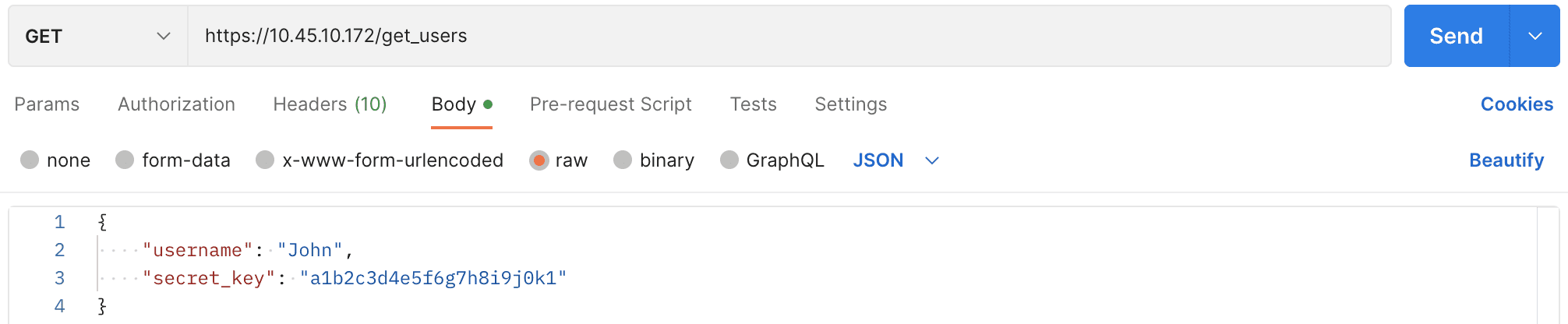
Getting Users and User Groups using Postman.
curl --location --request GET 'https://10.45.10.172/get_users' \
--header 'Content-Type: application/json' \
--data '{
    "username": "John",
    "secret_key": "a1b2c3d4e5f6g7h8i9j0k1"
}'
  {"success": true,
"users": [
  {
    "usergroups": [
      {
        "id": "5bebd9fdd8aaa42840edc84f",
        "name": "Logpoint Administrator"
      }
    ],
    "id": "5bebd9fdd8aaa42840edc853",
    "name": "admin"
  },
  {
    "usergroups": [
      {
        "id": "5bebd9fdd8aaa42840edc84f",
        "name": "Logpoint Administrator"
      }
    ],
    "id": "5e15969ff5f33401e60fe757",
    "name": "sample admin"
  },
  {
    "usergroups": [
      {
        "id": "5bebd9fdd8aaa42840edc850",
        "name": "User Account Administrator"
      }
    ],
    "id": "5e1bef95f5f33436dd3a9f07",
    "name": "sample user"
  }
]
  }